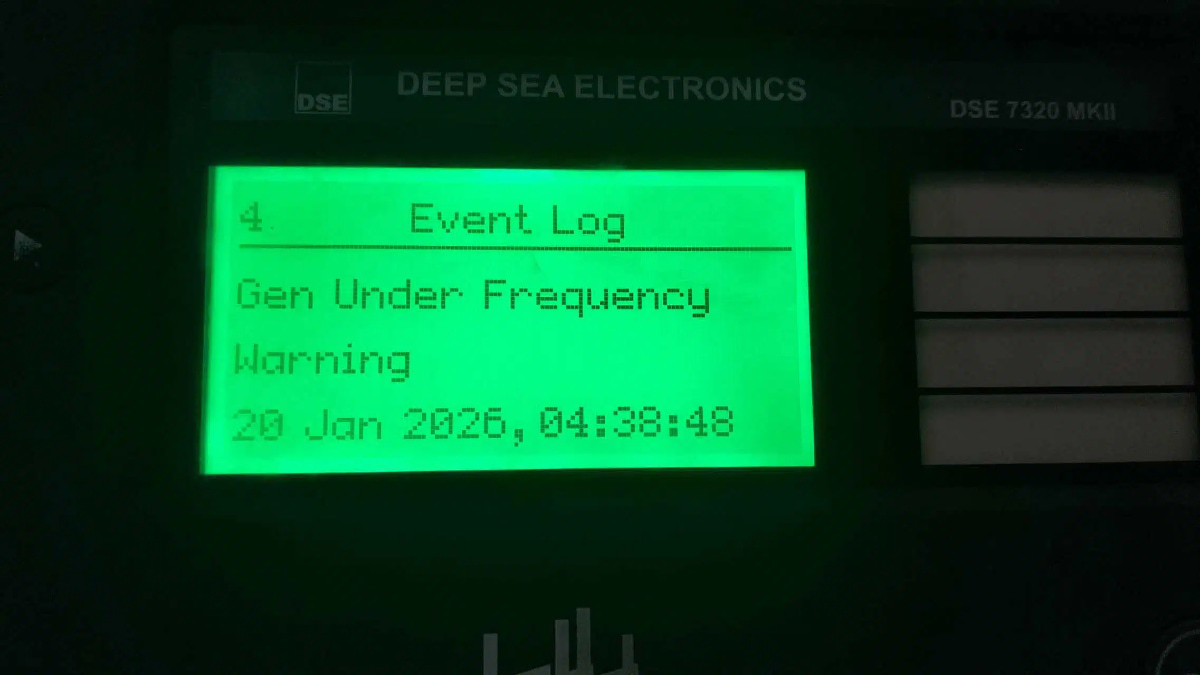
How To Solve Troubleshooting "Frequency Low" Alarm On Diesel Genset ?
Troubleshooting "Frequency Low" Alarm on a Diesel Genset Controller
A low frequency indication typically means the generator is running below its rated speed (e.g., below 50 Hz for 50 Hz systems or 60 Hz for 60 Hz systems). This is usually a speed/engine issue, not solely an electrical one, as frequency is directly proportional to engine RPM.
Immediate Actions & Safety First
1. Ensure Safety: Perform work in a well-ventilated area. Follow Lock-Out/Tag-Out (LOTO) procedures if accessing internal components.
2. Observe Load: Check the controller's load meter. Is the generator operating at or near its rated capacity?
Common Causes & Step-by-Step Solutions
Phase 1: Initial Checks
1. Check Applied Load
Symptom: Frequency dips only when a large load is applied.
Action: Reduce the connected load. If frequency recovers, the generator may be overloaded:Schedule the load sequentially or use a larger genset if this is a recurring issue.
Phase 2: Fuel System & Engine Performance**
2. Inspect Fuel Supply:
Check fuel tank level.
Check for clogged fuel filters, which restrict flow and cause power loss.
Replace filters if needed.
Bleed the fuel system to remove any air (air locks).
3. Check Engine Speed (RPM)
Use a handheld tachometer to verify the actual engine RPM.
If RPM is low: The problem is confirmed as an engine speed issue. Proceed to the governor and actuator.
Phase 3: Governor & Actuator System (Most Common Cause)
4. Mechanical/Hydraulic Governor:
Check linkage:Look for loose, worn, or binding linkages between the actuator and the fuel injection pump. Ensure smooth, full-range movement.
Adjust droop/gavernor:Refer to the engine manual. A slight adjustment of the speed droop or gain potentiometer on the controller may be needed.
Caution: Minor adjustments only.
5. Electronic Governor/Actuator:
Check Actuator:Locate the electronic actuator (often on the injection pump). Command a speed change from the controller while observing if the actuator arm moves freely and fully. A stiff or stuck actuator will cause speed/frequency issues.
Check Speed Sensors:Ensure the magnetic pickup (MPU) or speed sensor on the flywheel is clean, securely mounted, and has the correct air gap. A faulty sensor gives an incorrect speed signal.
Phase 4: Controller Settings & Calibration
6. Verify Controller Parameters:
Access the controller's parameter menu (with password).
Check that the Rated Frequency setting is correct (e.g., 50 Hz or 60 Hz).
Check the Speed (RPM) Setting matches the engine's rated speed (e.g., 1500 RPM for 50 Hz, 1800 RPM for 60 Hz).
Perform a Speed Calibration or Actuator Calibration as per the controller manual. This resets the control range.
Phase 5: Major Mechanical Issues
7. If problems persist, consider:
Faulty Fuel Injection Pump: Internal wear reduces fuel delivery.
Worn Engine Components:Low compression, etc., causing lack of power.
This requires a certified diesel engine technician.
Summary Checklist
1. Reduce load - rule out overloading.
2. Check fuel - filters, supply, air.
3. Measure actual RPM - confirm low speed.
4. Inspect & lubricate governor linkages- ensure free movement.
5. Test electronic actuator and speed sensor.
6. Review controller settings - frequency, RPM, and recalibrate.
7. Consult a technician for internal engine or injection pump issues.

 IPv6 network supported
 English
 français
 русский
 español
 português
 العربية
 Türkçe
 ไทย
ไทย Tiếng Việt
 Indonesia
  Filipino